Stop using AI the 2024 way: why you need a harness
别再用 2024 年的方式用 AI:为什么你需要一个 harness
2026-11-09 · basic 01
Most of us still do the AI’s homework first
Suppose you had to build a project end to end with AI today. How would you go about it?
My guess is that you would start by picking out the code you think is relevant and have the AI read it, so it understands how the code flows. Next you would paste in the requirement so it knows what to build. Those two steps alone take a lot of time. Then you would probably add a long list of TODOs and DO NOT DOs. And after that…
That is how many people use AI today. It has several problems. Each one is small on its own, but together they wear down your confidence in the tool. In this post I want to explain three things: what these problems are, what is behind them, and why you need a harness.
Where it falls short
The AI doesn’t know your project, so every session starts from zero
First, the AI doesn’t know your project. An agent in a new session knows nothing about it: how the code flows, where the entry points are, what each part does, where the traps are, what the conventions and the process are. It can only learn them inside the session, either by searching the code itself or because you paste in files and explanations.
What it learns lives only in that session. When the session ends it is gone, so next time you teach it again, and every time you pay again in time and tokens. This is one reason AI is slow to take hold in many teams: the AI doesn’t know the project, and teaching it is a cost you pay over and over.
A process written in a prompt is only a request
Second, the AI doesn’t follow your process every time. You want it to discuss the requirement first, then agree on a plan, then build, then write the unit tests and do the acceptance check, so you write those steps into the prompt. Most of the time it follows them, but now and then it skips one, and you can’t tell in advance which time.
The reason is that a process in a prompt is only a request to the model. It can follow it or not, and nothing checks whether it did. When it skips a step it apologises, “sorry, that was my mistake”, but an apology changes nothing, and your confidence drops another notch.
Checking what the AI got wrong takes longer than generating it
Third, what the AI gets wrong takes a long time to check. An AI can write hundreds of lines in seconds, but a person needs hours to review the code and run the tests. The usual fix for the first two problems is to put more words into the prompt, which uses up context and makes the agent’s output more likely to drift.
So many people conclude that the model isn’t smart enough and switch to a more expensive one, say from Sonnet to Opus, with thinking effort turned up to max. The bill goes up and the results seem a little better, but it still goes wrong now and then, because the problem is not how smart the model is. More on that below.
The AI is overconfident about its own work
Fourth, the AI is overconfident about its own work. It tells you “done, all tests pass”, you run them, and they fail.
Anthropic saw the same thing when building long-running agents: asked to evaluate work they had produced, agents tend to praise it confidently, even when a person would call the quality mediocre, and most of all on tasks like design, where there is no right answer to check against (Harness design for long-running application development). So you can’t rely on its “done”, and you check it yourself again.
Even good users are left with a black box
Fifth, even if you are good with AI, it is still a black box. You write your SOPs into SKILL.md and your conventions into AGENTS.md, yet you still can’t see what it is doing, and these problems remain:
- Task state and memory. A lost session means a half-finished task starts over.
- SKILL or AGENTS.md. There is no agreed answer, and a stuffed SKILL.md only saves a poor prompting habit.
- Cost and effort. A simple investigation may still call an expensive subagent.
- Agents split by job title. Developer, tester and project-manager agents, with a complicated workflow between them.
- Audit. Time, tokens and detours go unrecorded, so nothing can be analysed afterwards.
So many people retreat, and the AI becomes a thinking Google
Because of these problems, many people retreat to a comfort zone: I’ll do the development myself, let the AI generate a small piece of code or autocomplete, and copy and paste it in.
At that point the AI is a Google that can think. It answers questions, and the person is still the one who acts, decides the next step and checks the result.
The root cause: the AI is still a chatbot
You are still the loop that carries everything
All of these problems come from one thing: we still use AI as a chatbot. It answers, and I take the answer and do the work. I read the files, paste the code, decide the next step and check the result. The AI is a brain on the other side of a chat box, and I am the “loop” that connects everything.
Even if you have written your rules into SKILL.md and AGENTS.md, that only gives the chatbot more text to read: how far a task has got, what it cost and whether it came out right still have nothing managing them. That is why most engineers don’t dare to let AI take over a whole project. A cheap model wastes time and isn’t good enough; an expensive one seems better, but a few runs use up a month of tokens. So the AI ends up as a small code-generating assistant, and the big picture stays with a person.
First, what an agent adds to a chatbot
An agent hands the carrying to a program
To take that loop out of your hands, you first have to know what an agent adds. The model (an LLM such as Sonnet or Opus) only reads and writes text and has no hands, so it can’t touch your files or run a command.
It acts through Tool Calling. After thinking, the model writes a request, say “read src/export.ts”. A program outside the model (Copilot’s agent mode and Claude Code are such programs) actually runs it and hands the result back, and the model decides the next step: use another tool, or decide it is done and give you the answer. This process, which goes round and round, is called the agent loop. The figure shows its four parts: you, the LLM, the tools, and the outside world the tools reach, which is the browser, the files and the terminal.
The loop stops when the model says so
In an agent, the carrying is handed to a program. That is a big step, but it solves only half the problem. The loop ends when the model asks for no more tools. If the model thinks it is done, the loop stops, but thinking it is done is not the same as being done, and nothing in between has checked.
The model also remembers nothing between two rounds: the program rebuilds the prompt for every round, and whatever isn’t put in doesn’t exist for the model (How does an Agent actually work?).
An agent isn’t enough: the gap is outside the model
A smarter model does not fix these problems
Go back over these problems one by one and none of them is fixed by a smarter model. It doesn’t know your project because nobody put the project’s knowledge in front of it. It doesn’t follow your process because the process is a request in a prompt, with nothing watching whether it is followed. It says its own work is fine because there is no other point of view checking it.
As for lost task state, runaway cost and no way to look back, those have nothing to do with how smart the model is. They were never inside the model. They are all outside it.
Same model, only the layer around it changed
LangChain ran a test: the model stayed fixed (gpt-5.2-codex), and they changed only what surrounds it, the system prompt, the tools and the middleware. On a benchmark of 89 terminal tasks (Terminal Bench 2.0) the score went from 52.8% to 66.5% (Improving deep agents with harness engineering). This is their own result.
Same model; the difference was in what is around it.
Agent = Model + Harness
Put the pieces together and you get a formula that is now widely used: Agent = Model + Harness. LangChain’s Vivek Trivedy states it in a post on the anatomy of an agent harness, and defines the harness as every piece of code, configuration and execution logic that isn’t the model itself (The Anatomy of an Agent Harness).
The model holds the intelligence; the harness is what makes that intelligence useful: the loop that runs it, the tools it can call, what goes into its context, the checks before and after each step, and the records it leaves. A model with no harness is the chatbot from the start of this post, and the problems above are what a chatbot looks like when it is asked to do an agent’s job.
The harness comes in two kinds
The word harness is used in two ways, and mixing them up causes confusion.
The first is the general harness: the program that runs the loop. Claude Code, Codex and GitHub Copilot’s agent mode are general harnesses, which you download or buy. This layer is built by the model and platform vendors, and it changes quickly.
Your team’s harness is the layer you control
The second is your team’s harness: the layer you build on top of the general one for your own team, with your rules, your knowledge, your workflow, your guardrails, human approvals and an audit trail. Mine includes AGENTS.md, skills, subagents, specific tools, an agent workflow, a task life cycle, human-in-the-loop approvals, a gate and guardrails, observability and auditability, and more.
This series is about the second kind. You can only choose the general layer; your team’s layer is the one you control, and it decides how well AI works in your team.
In my harness
I built mine one problem at a time
My harness was not designed up front. It grew one problem at a time, and along the way I removed quite a lot that I had been sure was right. Each problem on the left now has a place on the right.
Below are four of them, to show what they do. Each gets its own post later in this series; here we only look at the result.
Explore once, keep the result
The AI doesn’t know your project: explore once, keep the result
Instead of letting the agent search the code again in every session, keep what it learned: one knowledge base per business domain, made of small cards that say what an object is for, its rules, what it uses and where the traps are. The agent reads it before it starts, so you don’t paste anything in.
Every card records which version of the code it was read from, so when the code changes I can list the cards that are now stale (the “Stale cards” in the screenshot).
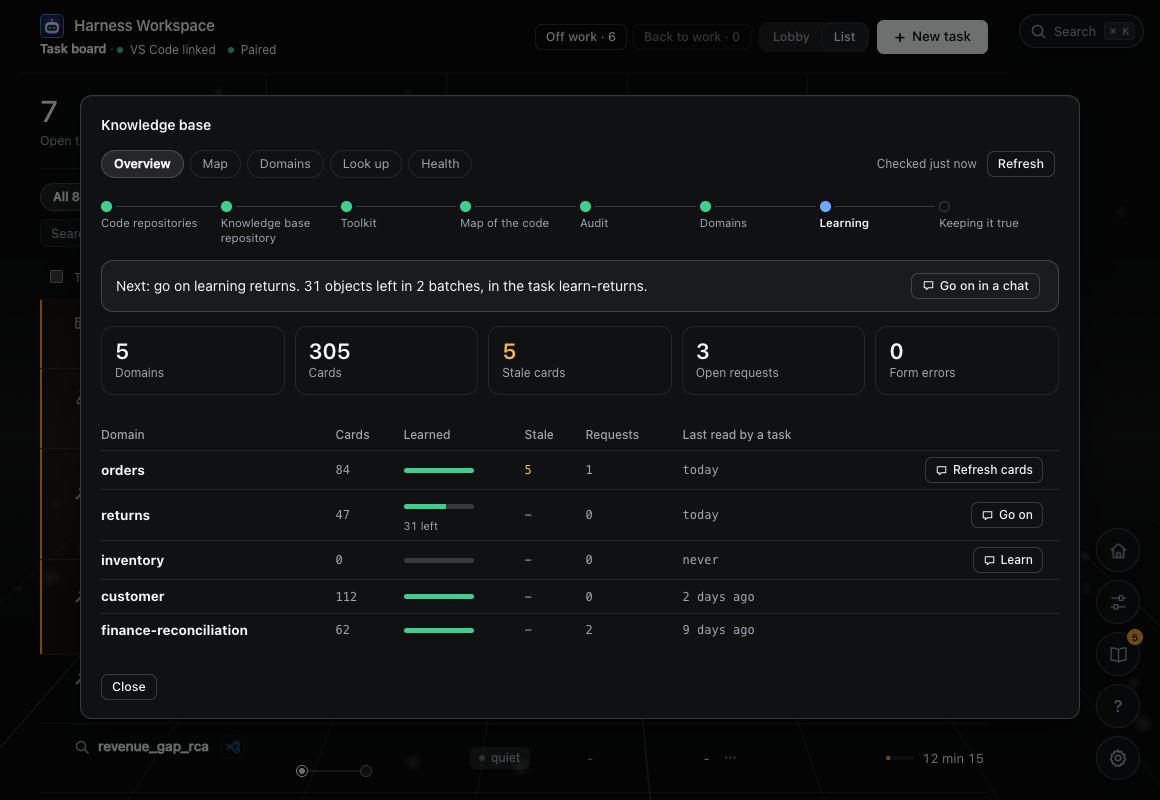
Work is a task, and code changes pass two approvals
It doesn’t follow your process: work is a task, and code changes pass two approvals
A piece of work is a task, which is a folder: the requirement, the plan, the steps and the changes are files, not chat history. The process is guarded by code: until you approve the plan the agent can’t write code, and until you approve again nothing enters your repository.
An approval is not a confirm box in the chat. It is an action only a real terminal can complete, where you type a code computed from what you read, so the agent can’t approve for you.
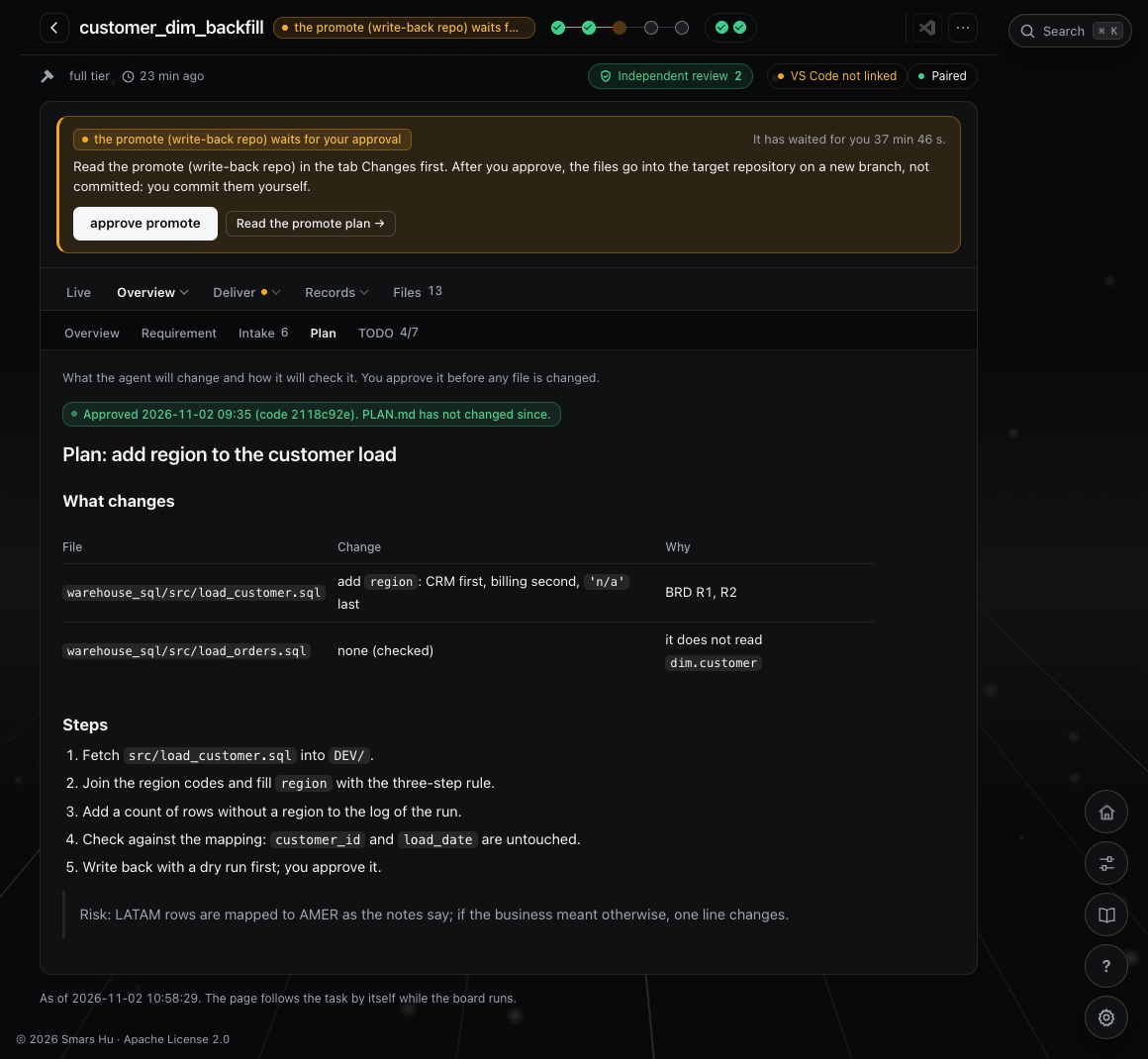
A reviewer that hasn’t seen the author’s reasoning checks the work
Checking: a reviewer that hasn’t seen the author’s reasoning
An author checking its own work is easily led by its own reasoning past its own mistakes. So when the work is done it goes to another reviewer, which has not seen that reasoning, looks only at the requirement, the result and the change, and must point to a file and a line.
How many checks is up to you: [review]=2 means it must pass twice in a row, and the passes are counted by code, not reported by the agent. The reviewer is often the same model and shares its blind spots, so this lowers the risk without removing it.
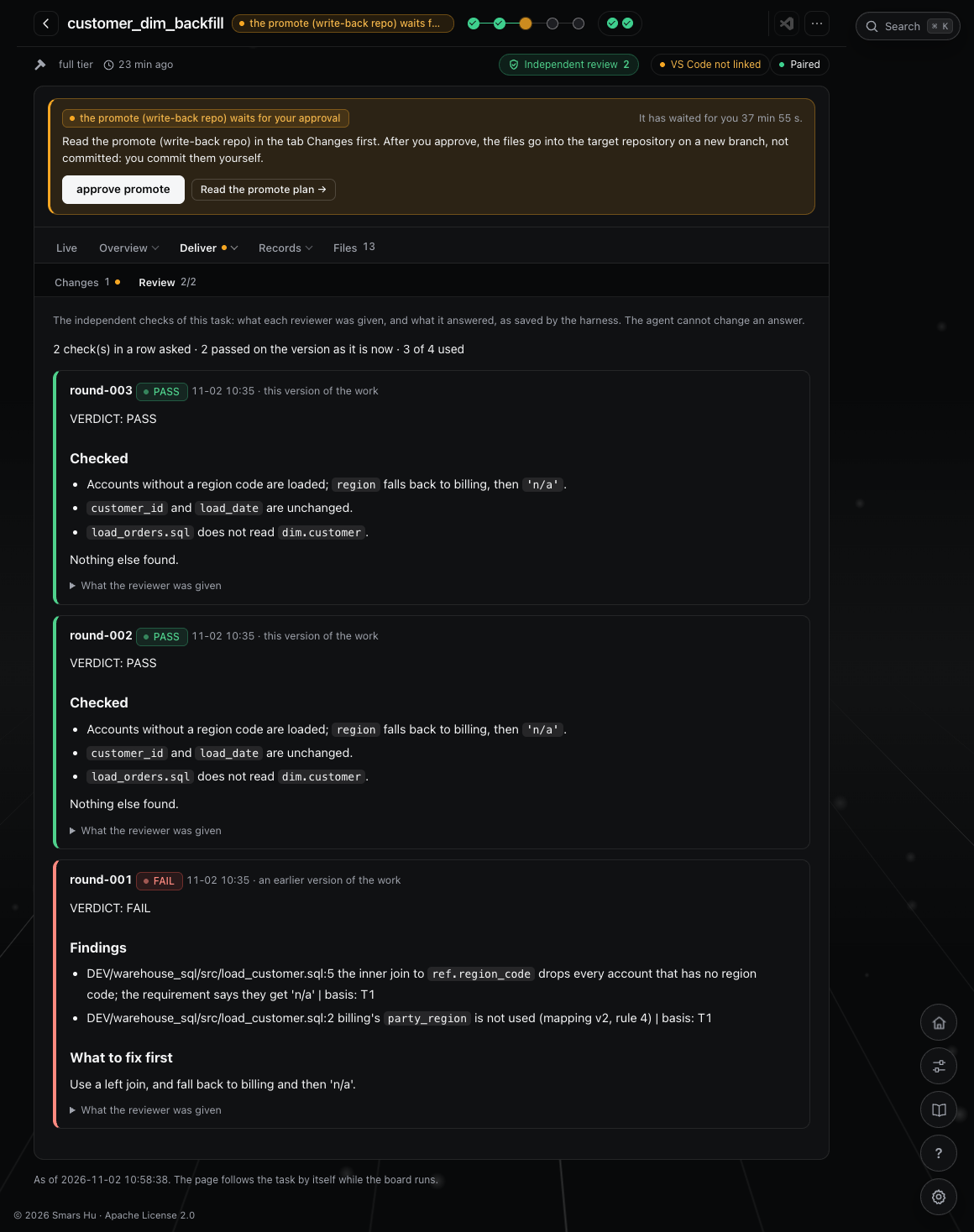
Where the time went: not what the agent says
Audit: where the time went, not what the agent says
Every task has a report generated by a program, with numbers from the harness’s own log and Copilot’s session record, not from the agent’s summary. In the task in the screenshot the agent worked for 32 minutes and then waited 2 hours 36 minutes for a person, which is 83%.
So the cost of that task is in the waiting, not in a slow agent, and the fix is different: fewer gates, or gates that are easier to pass.
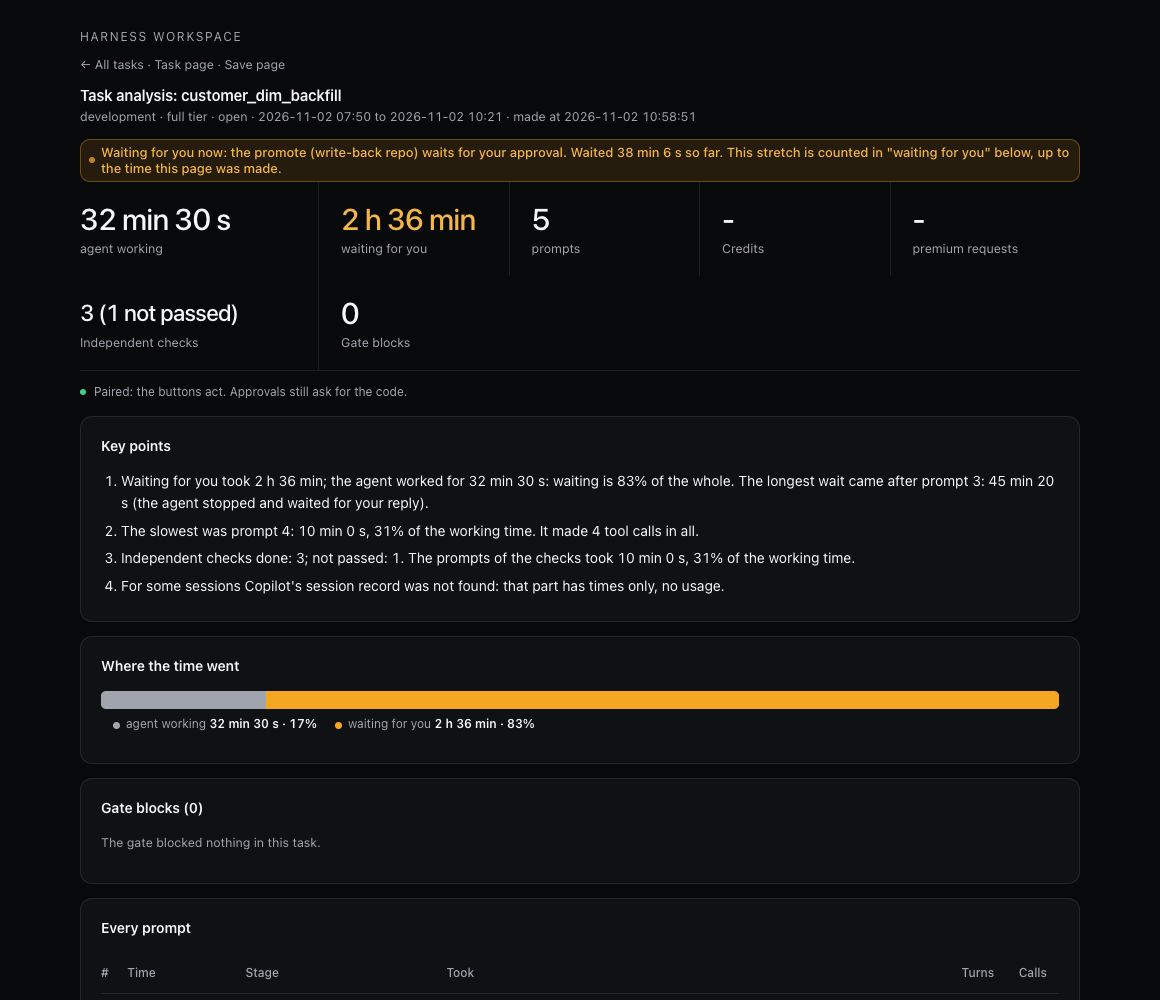
To sum up
The AI didn’t get dumber. Our use of it stayed in 2024.
The AI didn’t get dumber. Our use of it stayed in 2024: we treat it as a chatbot, and a person does the carrying, the process control and the checking. An agent hands the carrying to a program, and a harness hands the process, the checks and the limits to a program too, so a person can step back to judging and signing off.
If you are pushing AI in your team, the first question to ask is not “which stronger model should we switch to” but “what is missing around our AI”.
Try it in five minutes
Whether or not you use my harness, you can start with one thing. Take the last task that left you disappointed with an AI and ask whether the problem was “it wasn’t smart enough” or “it didn’t know, nothing was watching, nobody checked it separately”. Write the cases down and count how many fall into each kind.
Read the full article on smarshu.com
Read the full course: Harness Engineering
我们还在替 AI 做功课
假如今天非要让你用 AI 完成一个项目端到端的开发,你会怎么做?
我猜大概率,第一步,你会自己去挑选你认为有关的代码,让 AI 先理解代码流。第二步,你会把需求粘贴给 AI,让它知道要做什么。这两步已经花了很多时间。第三步,你可能会加很多 TODO,和很多 DO NOT DO。第四步……
这是今天很多人使用 AI 的方式。它有几个问题,每一个单独看都不大,但合起来,会一点一点折损人使用 AI 的信心。这篇文章我想讲清楚三件事:这些问题到底是什么,它们的根因在哪里,以及为什么需要一个 harness。
几个让人泄气的地方
AI 不知道你的项目,每个会话都要重新学
第一,AI 不知道你的项目。 一个新会话里的 agent 对你的项目一无所知:代码流是什么,程序入口在哪里,每一块负责什么功能,有哪些坑,开发规范和流程是什么。它只能在会话里现学,要么靠自己搜代码,要么靠你把文件和说明粘贴给它。
学到的东西只留在这一个会话里,会话一结束就没了,下一次要重新教一遍,每一次都在重复消耗时间和 token。这也是很多团队里 AI 落地很慢的一个原因:AI 不懂我的项目,而教它一遍的成本,又每次都要付。
写在 prompt 里的流程,只是一个请求
第二,AI 不会每一次都严格按你的流程走。 你希望它先和你讨论需求,再制定 plan,然后开发,最后做单元测试和验收检查,于是把这些步骤写进了 prompt。大多数时候它会照做,但总有一些时候漏掉其中一步,而且你事先不知道是哪一次。
原因在于,prompt 里的流程对模型来说只是一个请求,它可以照做,也可以不照做,中间没有任何东西在检查它到底做了没有。漏了步骤以后,它会说“对不起,是我的纰漏”,可是道歉改变不了什么,你的信心又掉了一格。
检查 AI 做错的东西,比让它生成更花时间
第三,AI 做错的东西,要花很久去检查。 AI 几秒钟就能生成几百行代码,但人 review 代码、跑测试,需要好几个小时。前两个问题的补救办法,往往是往 prompt 里塞更多的话,上下文被占掉很多,agent 生成的东西反而更容易跑偏。
于是不少人把原因归结为模型不够聪明,换一个更贵的,比如从 Sonnet 换到 Opus,再把 thinking effort 调到 max。账单上去了,表现似乎好一些,可是偶尔还是会出岔子,因为问题并不在模型的聪明程度上,这一点后面会讲到。
AI 检查自己的工作,往往过于自信
第四,AI 检查自己的工作,往往过于自信。 它会告诉你“已经完成,测试全部通过”,你一跑,是红的。
Anthropic 在做长时间运行的 agent 时也观察到了这一点:agent 评价自己产出的东西时,倾向于很有把握地夸赞,即使在人看来质量明显只是一般,在设计这类没有对错标准的任务上尤其明显(Harness design for long-running application development)。所以你没法相信它说的“做完了”,只好自己再查一遍。
哪怕已经很会用 AI,整个过程仍然是黑盒
第五,哪怕你已经很会用 AI,它依然是个黑盒。 你把固定的套路写进了 SKILL.md,把团队规范写进了 AGENTS.md,可是你仍然看不到它在做什么,下面这些问题还在:
- 任务状态和记忆。 会话一丢,做到一半的任务只能重来。
- SKILL 还是 AGENTS.md。 没有公认的答案,塞满内容的 SKILL.md,只是把不好的 prompt 习惯保存成了文件。
- 成本和投入。 一个简单的调查,也可能调用昂贵的 subagent。
- 按职业角色拆 agent。 开发的、测试的、项目管理的,再加一套复杂的流程让它们互相交互。
- 审计。 时间、token 和走过的弯路都没有记录,事后无从分析。
于是人退回了舒适区,AI 成了一个会思考的 Google
因为这些问题,不少人会退回到舒适区:还是我自己来开发,只让 AI 生成一小段代码,或者做自动补全,再由我复制粘贴进去。
这时候的 AI,其实是一个会思考的 Google:它回答问题,而真正动手、决定下一步、检查结果的,仍然是人。
根因:AI 依旧只是一个聊天机器人
根因:你还是那个负责搬运的循环
上面这些问题背后是同一件事:我们仍然把 AI 当成聊天机器人在用。它回答问题,我拿着答案去做,读文件的是我,粘贴代码的是我,决定下一步的是我,检查结果的也是我。AI 是聊天框那头的一个大脑,而我是那个把一切连起来的“循环”。
就算你已经把规矩写进了 SKILL.md 和 AGENTS.md,那也只是让这个聊天机器人读到更多的文字:任务做到哪里,花了多少,做对没有,依然没有任何东西替你管着。所以大部分工程师不敢让 AI 完整地接手一个项目:便宜的模型浪费时间、效果一般,贵的模型似乎好一些,却用不了几次就会花掉一个月的 token,最后只好让它做一个代码生成的小助理,大方向仍然由人把关。
先搞清楚:agent 比聊天机器人多了什么
agent 把“搬运”交给了一个程序
要把这个循环从人手里交出去,先要弄清楚 agent 多了什么。模型(LLM,比如 Sonnet、Opus)只会读文本、写文本,没有手,所以它碰不到你的文件,也运行不了命令。
它靠 Tool Calling 做事:模型思考以后,写出一个请求,比如“读一下 src/export.ts”,模型外面的程序(Copilot 的 agent 模式、Claude Code 都是这样的程序)去真正执行,把结果交回给模型,模型再决定下一步,是继续用工具,还是认为已经做完,把答案告诉你。这个一圈一圈转下去的过程,叫 Agent Loop。图里是循环里的四个角色:人、LLM、工具,以及工具能碰到的外部世界,也就是浏览器、文件和终端。
循环什么时候停,由模型说了算
在 agent 里,搬运的工作交给了程序,这是很大的一步,但它只解决了一半的问题。循环结束的条件,只是模型这一轮不再要工具。模型认为做完了,循环就停了,可是它觉得做完了,不等于真的做完了,中间没有任何东西替你检查过。
另外,模型在两轮之间什么都不记得:每一轮的 prompt 都是程序重新拼出来的,没有放进去的东西,对模型来说就不存在(Agent 到底是怎么干活的?)。
光有 agent 还不够:差距在模型外面
这些问题,换一个更聪明的模型解决不了
把前面的问题回头一条一条看,没有一个是换更聪明的模型就能解决的。它不懂你的项目,是因为没有人把项目的知识放到它面前;它不按流程走,是因为流程只是 prompt 里的一个请求,没有任何东西在盯着它有没有照做;它检查自己的工作总说没问题,是因为没有另一个视角来查。
至于任务状态丢失、成本失控、事后无法复盘,更和模型是否聪明没有关系。这些东西本来就不在模型里面,它们全都在模型外面。
同一个模型,只改它周围的一层,分数就不一样
LangChain 做过一次测试:模型固定不变(gpt-5.2-codex),只改它周围的系统提示词、工具和中间件,在一个有 89 个终端任务的基准(Terminal Bench 2.0)上,分数从 52.8% 提高到了 66.5%(Improving deep agents with harness engineering)。这是他们自己的测试结果。
同一个模型,拉开差距的,是它周围的东西。
Agent = Model + Harness
把这些放在一起,就得到一个现在很常用的说法:Agent = Model + Harness。LangChain 的 Vivek Trivedy 在一篇讲 agent harness 结构的文章里这样写,并且把 harness 定义为:除了模型本身以外,所有的代码、配置和执行逻辑(The Anatomy of an Agent Harness)。
模型里有智能,harness 让这份智能变得有用:跑它的循环、它能调用的工具、放进它上下文里的内容、每一步前后的检查,以及留下的记录。没有 harness 的模型,就是这篇文章开头的那个聊天机器人,而前面那些问题,正是聊天机器人被拿去做 agent 的工作时的样子。中文里 harness 可以叫驾驭工程。
harness 有两种
这个词有两种用法,混着用容易糊涂。
第一种是通用的 harness,也就是跑那个循环的程序:Claude Code、Codex、GitHub Copilot 的 agent 模式都是,下载或者购买就能用。通用的这一层由模型厂商和平台厂商在做,变化也很快。
团队自己的 harness,才是你能掌控的那一层
第二种是团队自己的 harness:你在通用的这一层上面,为自己的团队搭的另一层,包括规则、知识、工作流、护栏、人的批准,以及审计记录。我自己的这一层有 AGENTS.md、skill、subagent、专用工具、agent 工作流、任务生命周期、人在回路里的批准、gate 和护栏、可观测性和可审计性,还有别的。
这个系列讲的是第二种。通用的那一层你只能选用,而团队自己的这一层是你能掌控的,它决定了 AI 在你的团队里好不好用。
在我的 harness 里
我的 harness 是为这些问题一个一个长出来的
我自己的 harness 不是一开始就设计好的,它是为前面那些问题一个一个长出来的,中间还砍掉过不少我原来觉得很对的东西。左边的每一个问题,现在在右边都有对应的一处。
下面挑四个,看它们在做什么。每一个的做法,这个系列后面的文章会专门展开,这里只看结果。
AI 不懂你的项目:探索只付一次钱
AI 不懂你的项目:探索只付一次钱
与其让 agent 每个会话都重新搜一遍代码,不如把对代码的探索留下来:一个业务领域一份知识库,里面是一张一张的小卡片,记着一个对象是干什么的、它的规则、它用到谁,以及有哪些坑。agent 开工之前先读它,不用你每次粘贴。
每张卡片都记着它是在代码的哪个版本读出来的,代码变了,就能列出哪几张已经过期(截图里的 Stale cards)。
不按流程走:工作是一个任务,改代码要过两道批准
不按流程走:工作是一个任务,改代码要过两道批准
一件事是一个任务,也就是一个文件夹,需求、计划、步骤和改动都是文件,不是聊天记录。流程由代码来守:计划你没批准,agent 连代码都写不了;代码写完以后,在你再批准一次之前,什么都不会进入你的仓库。
批准不是聊天里的确认框,而是一个在终端里才能完成的动作,要敲一个从你读过的内容算出来的码,所以 agent 无法替你批准。
检查:换一个没见过作者思路的 reviewer 来查
检查:换一个没见过作者思路的 reviewer 来查
作者检查自己的工作,容易被自己的思路带着绕过自己的错。所以写完以后,交给另一个 reviewer:它没有见过作者的思路,只看需求、成品和改动,并且必须指出具体的文件和行号。
要查几轮由你来写,比如 [review]=2 表示必须连续两次通过,通过的次数由代码来数,而不是 agent 自己说。reviewer 往往是同一个模型,会有同样的盲区,所以这样只能降低风险,消除不了风险。
审计:时间花在了哪里,不靠 agent 怎么说
审计:时间花在了哪里,不靠 agent 怎么说
每个任务都有一份由程序生成的报告,数字来自 harness 自己的日志和 Copilot 的会话记录,而不是 agent 的总结。比如截图里的这个任务,agent 一共工作了 32 分钟,等人却等了 2 小时 36 分钟,占 83%。
这个任务的代价在等待上,而不是 agent 慢,解法也完全不同:少设几道关卡,或者让关卡更容易通过。
总结
AI 没有变笨,是我们的用法还停在 2024 年
AI 没有变笨,我们的用法还停在 2024 年:把它当成聊天机器人,人来做搬运、做流程控制、做检查。agent 把搬运交给了程序,harness 把流程、检查和边界也交给了程序,人才能退到只做判断和把关的位置。
如果你在团队里推 AI,值得先问的,不是“换哪个更强的模型”,而是“我们的 AI 周围,缺了什么”。
5 分钟试一下
不管你用不用我的 harness,都可以先做一件事:拿你上一次对 AI 感到失望的任务,回过头问自己,当时的问题是“它不够聪明”,还是“它不知道、没人盯着、没人另外查”。写下来,数一数这三类各有几次。
Read the full article on smarshu.com
Read the full course: Harness Engineering