A prompt cannot stop a dangerous action: a harness can
Prompt 拦不住危险操作:harness 可以
2026-11-09 · basic 06
Most of us put the rules in the prompt
Before asking an agent to do anything, a lot of us add a few ground rules to the prompt: don’t delete files, don’t run git push, don’t touch the production tables. I used to write prompts like that too. Most of the time the agent does what it is told, so it is easy to believe those few lines keep you safe.
They don’t. A rule in a prompt is only a request to the model, and before the model actually runs a command, nothing compares that command with your rule. In this post I want to explain three things: why rules in a prompt stop working, what actually stops a dangerous action, and how my harness does it.
Why rules in a prompt stop working
“It usually follows the rules” is exactly the problem
A real development task is not one or two steps. The agent reads files, searches the code, runs a query, edits a file, runs the tests, reads the output and edits again, and an hour of that easily comes to a few hundred tool calls. Every one of those calls is a fresh decision by the model, so your rules have to be remembered and followed in every one of them.
If the agent follows them for 299 calls and the 300th is a git reset --hard that wipes out your uncommitted work, or an UPDATE with no WHERE that rewrites a whole shared table, the 299 don’t help you. Safety is decided by the worst call, not the average one. The question is not whether the agent usually follows the rules, but whether anything stops it the one time it doesn’t.
The longer the task, the deeper the rules are buried
The first reason: the rules get buried. Your rules sit at the very top of the context, and every file the agent reads, every query result and every chunk of command output is added behind them. An hour later your three lines are a small piece of a very long text, and models already pay less attention to what is far back in a long context (Long chats get worse).
Nothing in the chat repeats the rules either, so they are weakest exactly when the agent has done the most work and is most eager to finish.
The agent is not breaking the rules, it is trying to finish
The second reason: the agent is not breaking the rules, it is trying to finish. Say a step fails because the working tree still has changes left over from an earlier attempt. The agent has two ways forward: stop and ask you what to do with them, or run git reset --hard and carry on. The second is faster, it gets the task moving at once, and nothing in that moment tells the agent it is wrong.
From where the agent stands, clearing what is in the way is doing the job. It needs no bad intent, only a goal and a shortcut. A rule in the prompt asks it to go against its own goal and take the slow road, and sometimes it won’t.
The model only writes a request; a program runs it
Look at how a command actually runs. The model only reads and writes text. It cannot touch your files or run a command. It can write a request for a tool call, something like “use run_in_terminal to run git push”, and what carries out that request is a program outside the model, which in VS Code is the Copilot agent (When an Agent misuses a tool, check its description and errors first).
A prompt is a request, and nothing checks the action
The root cause: a prompt is a request, and nothing checks the action. A command takes this path: your rule goes into the model, the model writes a command, and the command runs. Between the model and the run, no step compares the command with your rule, so whether the rule works depends on whether the model remembers it this time and chooses to follow it (A rule in a prompt is a request). For code style a miss costs a few minutes. For something you cannot undo, that is not enough.
What actually stops it
A hook checks every call, before it runs
Because the command runs outside the model, the fix goes between the request and the run: a check made by code. In VS Code Copilot that check is a hook, a small program you write that the platform calls at fixed moments. The one that matters here is PreToolUse, the moment before every tool runs.
The platform hands the hook the details of the call, which tool and which arguments, such as the full command line or the path about to be written, so the hook sees the real call and not the model’s description of it. It gives one of three answers: let it run, ask you first, or refuse. Because it is code, it behaves the same on the 1st call and the 300th, whatever the length of the chat and however much the agent wants to finish (Hooks, the point every call passes through).
Ask when it is sometimes right; refuse when it never is
Of the three answers, asking and refusing need to be told apart. Deleting a file is sometimes the right move, so letting you decide makes sense, but a confirm box only works while you actually read it. If the same box pops up fifty times a day, by the hundredth time you click Allow without looking (Asking is not a limit).
So for what the agent must never do, refuse outright and say why, and leave no box to click through. Keep asking for the cases where the answer really is sometimes yes.
A hook sees only the one call
A hook is a hard limit, but a narrow one, and it is worth knowing where it ends before you rely on it. It sees only the one call: the command the agent is about to run, not what the command does once it is running. If the agent writes a script and then runs it, the hook sees “run a script”, not the commands inside it.
So what you can say is “the agent can’t run these commands”, not “the agent can’t do damage”. A hook guards against mistakes. It is not a sandbox, and it won’t stop an agent that is set on getting round it. For that, give the agent less to reach from the start, such as an account with no write access to production, or a copy of the data (Some things you never hand over).
In my harness
My harness checks at several points
My harness does not rely on one rule. Several pieces of code check at different points: every tool call goes through the same hook; git commands are sorted into three tiers; the agent can write only in its own task folder; and a change to code needs two approvals from you.
How each of them is designed gets its own post later in this series. Here we look only at what they do.
Every tool call is checked before it runs
Every tool call is checked before it runs
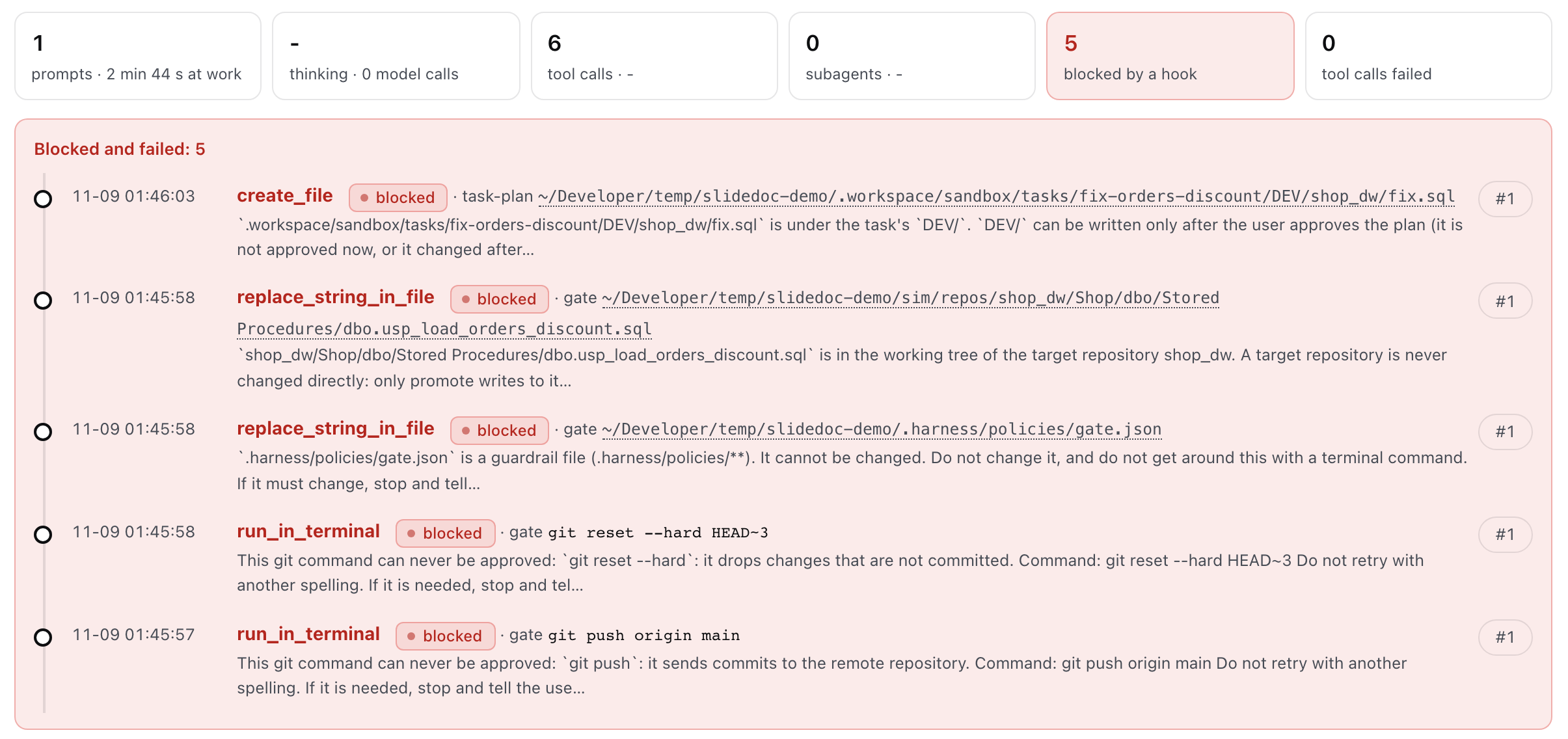
Every tool call the agent makes goes to the same hook program before it runs. In a test task I had the agent make five dangerous calls: a git push, a git reset --hard, an edit to the gate’s own rule file, a direct edit to the target code repository, and a write to the code folder before the plan was approved. All five were refused, each with its reason and the next step: do not retry with another spelling, and if it is needed, stop and tell the user why.
The full record is on the task page under Records, Agent actions, next to a count of the calls the hook blocked.
Git commands come in three tiers
I sort git commands into three tiers. Commands that only read, like git status, git diff and git log, just run. Commands that change the repository, like a commit, wait for your approval.
And a short list never runs from the agent, whatever it says: git push, git clean, git reset --hard, git branch -D and the commands that rewrite history. You run those yourself, in your own terminal. Deleting files falls into the ask-you tier.
Guard where the agent writes, not only what it runs
Guarding commands is not enough. A quiet edit is often more dangerous than rm -rf, such as a stored procedure changed straight in the repository, or the agent loosening the file that holds its own rules. So the check covers paths as well as commands: the agent writes only in its own task folder, the code repository changes only after you approve, and the rule files and the hook files are out of its reach.
An agent stuck behind a refusal may do something that looks reasonable, which is to loosen the rule a little (Guard the files that hold the rules).
Code changes pass two approvals from you
Code changes pass two approvals from you
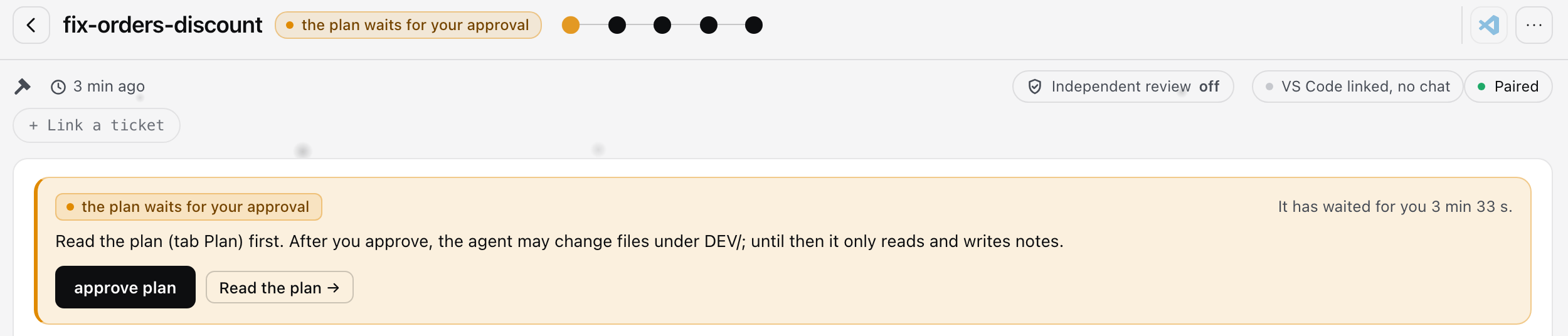
Code changes go through two approvals. The agent writes only in its task folder, and until you approve the plan it cannot even write code there, so you see what it intends to change before it changes anything. Once the code is done, nothing reaches your code repository until you approve again.
Both approvals are buttons on the board, and only a browser paired with your terminal can press them, so the agent cannot.
To sum up
Prompt for what to do. Code for what must never happen.
Use the prompt to tell the agent what to do: the goal, the background, what done looks like. That is most of the work, so keep writing it well. But anything that causes harm if it happens even once belongs in code that runs before every call, not in a sentence the model might forget.
Try it in five minutes
If you use my harness: open a task, ask the agent to run git push, and watch it get refused and stop. Then open the task page, go to Records, Agent actions, and read the reason it got.
If you don’t: you can build the smallest version yourself in about ten minutes, with one hook configuration file, a short program, and three or four rules for the commands you never want the agent to run. Test it with a harmless rule first, such as one that refuses echo hook-test: ask the agent to run that command, and check that the refusal comes back with your reason (A minimal harness in 30 minutes).
Read the full article on smarshu.com
Read the full course: Harness Engineering
很多人把规矩写在 prompt 里
让 agent 干活之前,很多人会先在 prompt 里写几句规矩:不要删文件,不要 git push,不要动生产环境的表。我自己以前也是这么写的。agent 大多数时候也确实照做了,所以很容易觉得,写了这几句,事情就安全了。
但这些规矩并不能保证安全。写在 prompt 里的规则,本质上只是对模型的一个请求,在它真正执行一条命令之前,没有任何东西会拿这条命令和你的规则对一下。这篇文章我想讲清楚三件事:为什么 prompt 里的规则会失效,真正能拦住危险操作的是什么,以及我的 harness 是怎么做的。
为什么写在 prompt 里的规则会失效
“大多数时候照做”,恰恰是问题所在
一个真实的开发任务,agent 不会走一两步就结束:它要读文件、搜代码、跑查询、改文件、跑测试、看输出,再改,一个小时下来,几百次工具调用(Tool Calling)是很正常的。每一次调用都是模型重新做的一次决定,你写的规则,要在每一次决定里都被记住、被遵守。
前 299 次它都照做,第 300 次是一句 git reset --hard,把没提交的改动清空了,或者一句没带 WHERE 的 UPDATE,改了整张共享的表,那前面 299 次照做就没有任何用处。安全不看平均,看最坏的那一次:该问的不是“agent 通常会不会遵守规则”,而是“它不遵守的那一次,有没有东西拦得住它”。
对话越长,规则被埋得越深
第一个原因:规则被埋得越来越深。 你的规则写在对话的最开头,也就是上下文(context)的最前面,之后 agent 读的每一个文件、拿到的每一次查询结果、看到的每一段命令输出,都接在它后面。一个小时以后,那三行规则只是一大段很长的文本里很小的一块,而模型对长上下文里靠前内容的注意力本来就会变弱(对话越久,Agent 越笨)。
对话里也没有人会把规则再说一遍,所以偏偏在 agent 干了最多的活、最想收尾的时候,你的规则是最弱的。
Agent 不是在违规,它是在赶着完成任务
第二个原因:agent 不是在违规,它是在赶着完成任务。 比如某一步失败了,原因是工作区里留着上一次尝试没清掉的改动,这时摆在它面前有两条路:停下来问你这些改动怎么处理,或者直接跑一句 git reset --hard,然后接着干。第二条更快,任务马上就能往下走,而且在那一刻没有任何东西告诉它这样不对。
站在 agent 的角度,把挡路的东西清掉,就是在认真干活,它不需要坏心思,只需要一个目标,再加一条捷径。prompt 里的规则等于要它违背自己的目标去走慢路,有时候它就是不会这么做。
模型只写请求,真正执行的是一个程序
看一条命令是怎么跑起来的:模型(LLM)只会读文本、写文本,碰不到你的文件,也运行不了命令,它能做的,是写出一个工具调用的请求,比如“用 run_in_terminal 运行 git push”,真正去执行的,是模型外面的程序,在 VS Code 里就是 Copilot 的 agent(Agent 用不好工具,先看工具的描述和报错)。
根因:prompt 是请求,动作发生之前没有任何检查
根因:prompt 是请求,动作发生之前没有任何检查。 一条命令走的路是:你的规则进入模型,模型写出一条命令,命令被执行,在模型和执行之间,没有任何一步会拿命令去和你的规则比对。规则能不能生效,完全取决于模型这一次记不记得、愿不愿意照做(为什么 Agent 不听 prompt 里的规则?)。对代码风格、命名这类事,偶尔漏一次,最多浪费几分钟;对删了就回不来的操作,这就不够了。
真正能拦住它的是什么
hook:每一次调用之前,用代码检查
既然执行发生在模型外面,解法就在请求和执行之间:加一道用代码做的检查。在 VS Code Copilot 里,这道检查叫 hook:你写的一个小程序,平台在固定的时机调用它,其中最关键的一个时机是 PreToolUse,也就是每一个工具运行之前。
平台会把这次调用的内容交给它:用的是哪个工具,参数是什么,比如完整的命令行、要写的文件路径,所以它拿到的是真实的调用,不是模型对自己在做什么的描述。它给出三种回答之一:放行、先问你,或者拒绝。因为它是代码,第 1 次调用和第 300 次调用它都一样执行,不在乎对话有多长,也不在乎 agent 有多想尽快做完(硬性规则放在哪?用 hook)。
该问的问,绝对不能做的直接拒绝
三种回答里,“先问你”和“拒绝”要分清。删除文件有时候确实有理由,交给你判断是合理的,但确认框只在你认真看它的时候才有用:同一个框一天弹五十次,到第一百次,你基本就是不看直接点 Allow 了(“先问我”为什么挡不住 Agent?)。
所以绝对不能由 agent 来做的事,应该直接拒绝,并且写清理由,不给它一个可以点过去的框。有时候是对的事,才用“问”。
hook 只看得到这一次调用
hook 是一个很硬的限制,但它的范围很窄,依赖它之前要先知道边界在哪。它只看得到这一次调用:看到的是 agent 准备运行的那一行命令,而不是这条命令运行起来以后做了什么。比如 agent 先写一个脚本再运行它,hook 只看到“运行一个脚本”,看不到脚本里的命令。
所以我们能说的是“agent 不能运行这些命令”,而不是“agent 不会造成破坏”。它防的是失误,不是沙箱,防不住一个铁了心要绕过去的 agent;真要做到这一点,要从一开始少给 agent 能碰到的东西,比如一个没有生产写权限的账号,或者一份数据的副本(不要开放全部的权限或使用沙箱)。
在我的 harness 里
我的 harness 在几个位置检查
我的 harness 不是靠一条规则,而是靠几处代码在不同的位置检查:每一次工具调用都由同一个 hook 检查;git 命令分三档;agent 只能写自己的任务文件夹;改代码要过你的两道批准。
每一处是怎么设计的,这个系列后面的文章会专门展开,这里只看它们在做什么。
每一次工具调用,执行之前都会被检查
每一次工具调用,执行之前都会被检查
agent 发出的每一次工具调用,执行之前都会交给同一个 hook 程序。在一个测试任务里,我让 agent 发出五个危险的调用:一句 git push,一句 git reset --hard,一次修改 gate 自己的规则文件,一次直接修改目标代码仓库,还有一次在计划批准之前往代码目录里写文件。五个全部被拒绝,每一条都带着原因和下一步:不要换一种写法重试,如果确实需要,停下来告诉用户为什么。
完整的记录在任务页的 Records → Agent actions 里,旁边还有被 hook 拦下的次数。
git 命令分三档
我把 git 命令分成三档:只读的命令,比如 git status、git diff、git log,直接放行;会改仓库的命令,比如 commit,要等你批准。
还有一小份名单,不管 agent 怎么说,都不会由它来运行,包括 git push、git clean、git reset --hard、git branch -D 和改写历史的命令,这些由你自己在终端里运行。删除文件则走“问你”这一档。
不光要管它运行什么,还要管它写到哪
只管命令是不够的。一次不声不响的修改往往比 rm -rf 更危险,比如直接改了代码仓库里的存储过程,或者把存放它自己规则的文件放宽一点。所以检查同时覆盖命令和路径:agent 只能写自己的任务文件夹,代码仓库要你批准了才会改,规则文件和 hook 文件它根本改不了。
一个被拒绝卡住的 agent,很可能做一件看上去很合理的事,就是把规则放宽一点(别让 Agent 改自己的规则)。
代码改动要过你两道批准
代码改动要过你两道批准
代码的改动要经过两次批准。agent 只能在任务文件夹里写,而且在你批准计划之前,它连代码都写不了,所以动手之前,你就能看到它打算改什么;代码写完以后,在你再批准一次之前,什么都不会进入你的代码仓库。
这两次批准都是看板上的按钮,只有和你的终端配对过的浏览器才能按,agent 按不了。
总结
Prompt 管“做什么”,代码管“绝对不能做什么”
prompt 用来告诉 agent 做什么:目标、背景、做完是什么样子,这是大部分的工作,继续好好写。但凡是发生一次就会出事的事,都应该交给一段在每次调用之前运行的代码,而不是交给一句模型可能会忘记的话。
5 分钟试一下
如果你在用我的 harness:开一个任务,让 agent 运行 git push,看它被拒绝、停下来,然后打开任务页,进 Records → Agent actions,读一下它收到的理由。
如果你没用:最小的版本你自己大约十分钟就能搭起来,一个 hook 配置文件,一个很短的程序,再加三四条你绝对不想让 agent 运行的命令规则。先用一条无害的规则来测,比如拒绝 echo hook-test,让 agent 去运行这条命令,看拒绝和你写的理由有没有返回来(30 分钟搭一个最小 harness)。
Read the full article on smarshu.com
Read the full course: Harness Engineering